

ترسیم توابع و منحنی های تراز در متلب
ترسیم توابع دو متغیره و سه متغیره و منحنی های تراز
ترسیم توابع عددی دو متغیره

> x=-1:.1:1;
>> y=0:.1:4;
>> [X,Y]=meshgrid(x,y);
>> f=inline(’10*x.^2+y.^2′,’x’,’y’)
f =
Inline function:
f(x,y) = 10*x.^2+y.^2
>> surf(X,Y,f(X,Y))
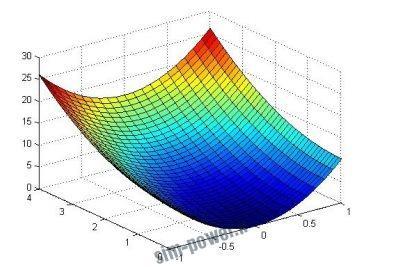
– راه کوتاه : ابتدا محدوده صفحه X-Y را در corners وارد می کنیم.
>> clear
>> f=inline(’10*x.^2+y.^2′,’x’,’y’)
f =
Inline function:
f(x,y) = 10*x.^2+y.^2
>> corners=[-1 1 0 4];
>> qsurf(f,corners)
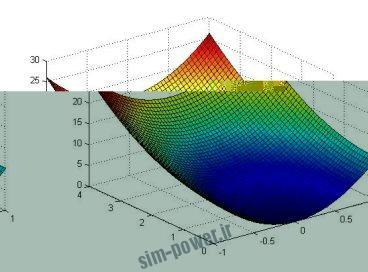
ملاحظه می گردد که mesh بندی دقیقتر است.
ترسیم توابع دو متغیره با مختصات قطبی

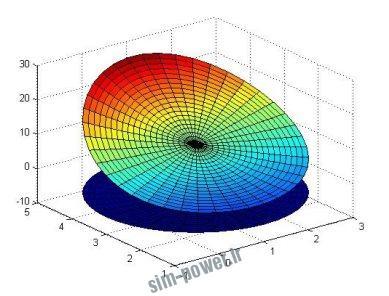
>> %first make a meshgrid in r,theta-coordinates
>> r=linspace(0,2,21);
>> thetta=linspace(0,2*pi,41);
>> [R,TH]=meshgrid(r,thetta);
>> %now convert into a curvlinear
>> X=1+R.*cos(TH);
>> Y=3+R.*sin(TH);
>> Z=X-1+Y.^2;
>> surf(X,Y,Z)
>> %add the plane Z=-5
>> hold on
>> surf(X,Y,-5+0*Z)
>> hold off

>> r=linspace(0,1,21);
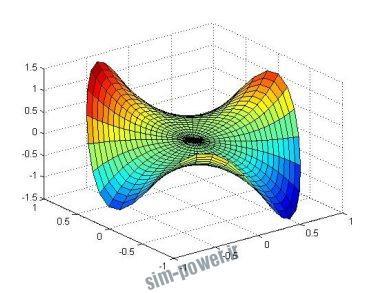
>> thetta=linspace(0,2*pi,41);
>> [R,TH]=meshgrid(r,thetta);
>> X=R.*cos(TH);
>> Y=R.*sin(TH);
>> Z=0.5*R.*sin(TH)+R.^3.*cos(3*TH);
>> surf(X,Y,Z)
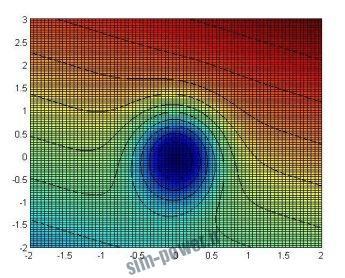
منحنیهای تراز

>> x=-2:.05:2;
>> y=-2:.05:3;
>> [X,Y]=meshgrid(x,y);
>> f=inline(‘-6*exp(-3*x.^2-y.^2)+.5*x+y’,’x’,’y’);
>> Z=f(X,Y);
>> pcolor(X,Y,Z)
>> hold on
>> contour(X,Y,Z,10,’k’)
>> hold off
تکنیک رسم سریع توابع دو متغیره
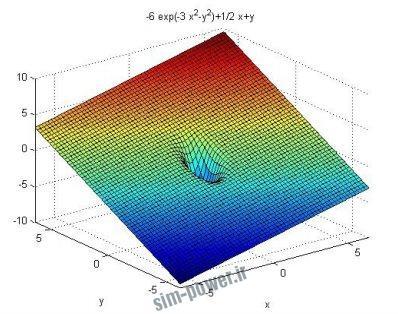
تابع بالا را رسم میکنیم:
> syms x y
>> f=-6*exp(-3*x^2-y^2)+.5*x+y;
>> ezsurf(f)
رسم بردار گرادیان و منحنی تراز

>> f=inline(‘x.*y-(x.^3)/3′,’x’,’y’);
>> fx=inline(‘y-x.^2′,’x’,’y’);
>> fy=inline(‘x’,’x’,’y’);
>> x=-2:0.05:2;
>> y=x;
>> [X,Y]=meshgrid(x,y);
>> Z=f(X,Y);
>> levels=[-6:0.5:6];
>> contour(X,Y,Z,levels)
>> hold on
>> xx=-2:0.2:2;
>> yy=xx;
>> [XX,YY]=meshgrid(xx,yy);
>> U=fx(XX,YY);
>> V=fy(XX,YY);
>> quiver(XX,YY,U,V)
>> axis equal
 ترکیب رشته های خانه آرایه
 برخی دستورات ساده سازی و ویرایش در متلب